
How to start a blog in 2026. You keep telling yourself that this is the year you’ll finally start your blog. But then the moment passes, the laptop closes, and nothing actually changes.
Excuses begin to take over. Maybe it feels too late. Maybe it seems like every topic is already covered. Or maybe there’s that quiet doubt in your mind that no one will really care about what you have to say.
I have been there too. A few years ago, I was stuck in the exact same loop staring at an empty screen, overthinking every decision, and waiting for the “perfect” moment that never came.
What I didn’t realize back then is this: every month you delay is an opportunity lost. You miss out on building your audience, improving your skills, and creating something that could eventually generate income.
So take a moment and be honest with yourself—how long will you stay in that cycle?
The good news is, you don’t have to.
In this step-by-step guide, i will walk you through exactly how to start a blog using a simple, proven setup-the same approach many successful bloggers rely on today without making things complicated or overwhelming.
Disclosure: This article may include affiliate links. If you make a purchase through these links, we might receive a small commission—without any additional cost to you.
Introduction to Blogging the Right Way
Starting a blog can turn into a strong online business, but it’s important to understand one thing from the beginning—it doesn’t happen overnight. Blogging is a long-term game. Your success depends on the niche you choose, the quality of your content, how consistently you publish, how well you promote your posts, and most importantly, your patience.
Many beginners enter blogging thinking it’s a quick way to earn money, but the reality is different. It takes time to build traffic, trust, and authority. However, if you approach it the right way, a blog can grow into a reliable source of income and even a full-time career.
At this point, it’s normal to feel confused or overwhelmed.
Questions like:
- How do I start a blog that actually makes money?
- What topics should I choose?
- How do bloggers earn income?
- What steps should I follow as a beginner?
These are the exact questions most new bloggers have when they begin their journey.
In the next sections, you’ll find clear and practical answers to these common doubts, so you can start your blog with confidence and move in the right direction from day one.
What Is a Blog? (Beginner Guide for How to Start a Blog in 2026)
A blog is a type of website where you regularly publish content (called blog posts) to share information, ideas, experiences, or solutions with an audience. These posts are usually displayed in reverse chronological order, meaning the latest content appears first.
In simple words, a blog is your own platform on the internet where you can write about topics you care about—whether it’s technology, travel, finance, health, or anything else—and connect with people who are searching for that information.
How Blogging Works in 2026
In 2026, blogging is no longer just about writing articles. It has evolved into a complete content ecosystem. A modern blog includes:
- Informative and SEO-optimized articles
- Visual content like images, banners, and infographics
- Integration with social media platforms
- Email newsletters to build an audience
- Monetization methods like ads, affiliate links, and digital products
This means when you learn how to start a blog in 2026, you’re not just creating a simple website—you’re building a digital asset that can grow over time.
Why People Start Blogs Today
People start blogs for different reasons, such as:
- Sharing knowledge or personal experiences
- Building an online brand or authority
- Driving traffic to a business or service
- Earning passive income online
- Creating long-term digital assets
Whether your goal is to make money or simply express your ideas, blogging gives you full control over your content and your audience.
Blog vs Website – What’s the Difference?
A blog is technically a type of website, but the key difference is that blogs are regularly updated with new content. While a traditional website may remain static (like a business homepage), a blog keeps growing with fresh posts, helping it rank better on search engines and attract ongoing traffic.
If you’re learning how to start a blog in 2026, understanding what a blog actually is should be your first step. It’s more than just writing—it’s about creating value, building trust, and consistently helping your audience. Over time, this is what turns a simple blog into a successful online platform.
Why Should You Start a Blog in 2026?
Starting a blog today is more than just a hobby—it’s an opportunity to create something meaningful on the internet. Even if you begin casually, there’s always someone out there searching for the exact information, ideas, or guidance you can provide.
Think about it—every day, people search for things like “simple home recipes” or “how to bake bread step by step.” Behind each search is a real person looking for help. If you have knowledge, experience, or even a passion for a topic, blogging gives you a way to reach those people.
When you learn how to start a blog in 2026, you’re not just writing posts—you’re building a platform where your ideas can help others, solve problems, or inspire action.
For example, if you enjoy cooking, you can share your own recipes, kitchen tips, and personal experiences. Over time, your blog can grow into a space where readers trust your content, follow your updates, and even become part of your community.
But the benefits don’t stop there. Blogging also opens the door to earning income. As your blog grows, you can monetize it through different methods like affiliate links, ads, or selling your own products.
Most importantly, blogging allows you to spend your time creating something valuable instead of just consuming content. It gives purpose to your efforts and helps you turn your passion into something productive.
In simple terms, when you choose to start a blog, you’re choosing to build, share, and grow—rather than staying stuck doing nothing.
I Have No Technical Experience — Can I Start a Blog in 2026?
Yes, you absolutely can.
One of the biggest myths about blogging is that you need coding skills or technical knowledge to get started. That might have been true years ago, but in 2026, things are much simpler. Today’s blogging tools are designed for beginners, which means you can launch and manage a blog without writing a single line of code.
When you learn how to start a blog in 2026, you’ll realize that most of the process involves using user-friendly platforms, drag-and-drop editors, and ready-made templates. These tools handle the technical side for you, so you can focus on creating content and growing your blog.
Of course, learning some basic skills over time can be helpful—but it’s not required to begin. You can start with zero experience and improve as you go.
This guide is created especially for beginners like you. It walks you through each step in a simple and practical way, using tools that are easy to understand and use.
By following the process, you’ll be able to set up a professional blog—especially a WordPress blog, which is one of the most popular and beginner-friendly options—without feeling overwhelmed.
The key is to start first. You don’t need to be an expert. You just need to take the first step and learn along the way.
Do You Need to Be a Great Writer to Start a Blog in 2026?
Not at all.
You don’t need to be a professional writer to begin blogging. What really matters is your ability to share your thoughts, experiences, and knowledge in a way that people can understand and relate to.
When you start learning how to start a blog in 2026, you’ll notice that successful blogs are not always written by experts in writing—they’re created by people who communicate clearly and genuinely.
Think of it like learning any new skill. In the beginning, things might not feel perfect, and that’s completely normal. Over time, as you keep writing and publishing, your confidence and writing style will naturally improve.
Instead of trying to sound perfect, focus on:
- Explaining things in a simple way
- Sharing real experiences or useful insights
- Helping your readers solve a problem
Readers connect more with honesty and clarity than with complicated words or perfect grammar.
So don’t wait until you feel like a “perfect writer.” Start where you are, keep practicing, and you’ll get better with every post you publish.
Can You Make Money with a Blog in 2026?
Yes, earning money from a blog is absolutely possible—but it depends on how much value you provide to your audience.
When you understand how to start a blog in 2026, one thing becomes clear: income comes as a result of helping people. If your blog solves real problems, answers common questions, or provides useful insights, it naturally creates opportunities to earn.
The foundation of a profitable blog is high-quality, helpful content. Without that, monetization becomes difficult. But once you start attracting readers and building trust, there are multiple ways to generate income.
Some common methods include:
- Promoting products or services through affiliate marketing
- Publishing sponsored content in collaboration with brands
- Selling your own digital products like ebooks or guides
- Offering physical products or services
- Displaying ads on your blog
As your blog grows, companies may also reach out to you directly for partnerships and promotions.
The key is not to focus only on money in the beginning. First, concentrate on creating valuable content and building an audience. Once you do that, monetization becomes a natural next step in your blogging journey.
How Much Does It Cost to Start a Blog in 2026?
When you’re learning how to start a blog in 2026, one of the first questions that comes to mind is the cost—and the good news is, you have flexible options.
You can start a blog for free, or you can invest a small amount to build something more professional and income-focused.
Free blogging platforms are a good way to explore, but they come with limitations. You don’t get full control, branding options are restricted, and monetization opportunities are often limited. In many cases, even if you start earning, the platform may take a share or restrict how you make money.
That’s why most serious bloggers choose to invest in a self-hosted setup, especially a WordPress blog. It gives you complete control over your content, design, and income methods.
The best part? You don’t need a big budget to get started.
As a beginner, you can launch a professional blog with a small investment. Typically, your first month’s cost can range between $15 to $75, depending on the hosting plan, domain, and additional features you choose.
This guide is designed to help you keep your costs low while still building a strong foundation for your blog.
So if you’ve been holding back because of budget concerns, don’t worry—you can start small, grow step by step, and scale your blog as it begins to generate results.
Step 1: Choose the Right Blog Topic (Niche)
When learning how to start a blog in 2026, the first and most important step is selecting your blog topic—also known as your niche. This decision shapes everything, from the type of content you create to the audience you attract.
If you already run a business or offer a service, your blog should focus on topics related to what you sell. This helps you attract the right audience and promote your offerings naturally through your content.
But if you’re starting as an individual, your niche should be something you genuinely enjoy talking about. Your blog will revolve around this topic, so it’s important to pick something you won’t get bored of over time.
How to Choose the Right Niche
Before finalizing your topic, ask yourself two simple but powerful questions:
- Do I genuinely enjoy this topic and can I consistently write about it?
- Are people actively interested in this topic and searching for it online?
The ideal niche is where your interest and audience demand meet. If you have some knowledge, experience, or even strong curiosity about a subject, that’s a great starting point.
Understand Your Audience Choosing a topic is only half the process—you also need to understand who you’re writing for. Knowing your audience helps you create content that actually connects.
For example, if you love cooking, you could start a food blog. But instead of writing randomly, think about your readers:
- Are they beginners looking for simple recipes?
- Do they want quick weekday meals or special weekend dishes?
When you create content based on what your audience needs, your blog becomes more useful and engaging.
Popular Blog Niches in 2026
If you’re still unsure, here are some popular niches you can consider:
- Beauty and Fashion
- DIY and Crafts
- Health and Fitness
- Home Decor
- Education
- Food and Recipes
- Travel
- Technology
- Parenting
- Lifestyle
- Personal Finance
Don’t overcomplicate this step. You don’t need the “perfect” topic to start. Choose something you enjoy, begin creating content, and improve along the way.
Taking action is more important than waiting for the perfect idea—because that’s how you truly begin your journey of how to start a blog in 2026.
Step 2: Choose the Right Blogging Platform
As you learn how to start a blog in 2026, the next step is selecting a blogging platform—the tool that allows you to create, manage, and publish your content online.
Think of a blogging platform as the foundation of your blog. Just like a well-equipped kitchen helps a restaurant run smoothly, the right platform makes it easier for you to create content, customize your site, and grow your audience.
Why Your Platform Choice Matters
Not all blogging platforms are the same. Some are designed for beginners with simple features, while others offer advanced customization but may require more time or investment to unlock their full potential.
Choosing the right platform early on is important because it affects:
- How easily you can design your blog
- How much control you have over your content
- Your ability to monetize in the future
- The overall growth of your blog
The Most Popular Choice in 2026
When it comes to blogging, WordPress stands out as the most widely used platform—and for good reason.
It offers:
- A user-friendly interface for beginners
- Thousands of themes and plugins for customization
- Full control over your website
- Flexibility to scale your blog as it grows
Another big advantage is that the core software is free to use, making it accessible even if you’re just starting out.
If you’re serious about understanding how to start a blog in 2026, choosing the right platform is a crucial step. A reliable and flexible platform like WordPress gives you the freedom to build, customize, and grow your blog without unnecessary limitations.
Once your platform is set, you’re ready to move on to the next step—bringing your blog to life.
WordPress is a popular platform that helps you create and manage a blog or website without any coding skills. It is widely used by beginners, bloggers, and businesses because it is easy to use, flexible, and gives full control over your content.
If you’re learning how to start a blog in 2026, WordPress is one of the best tools to begin with.
This is the same method I used to build this blog you’re reading right now.
But you might be wondering can wordpress really handle everything you need?
Let’s move to the next step and clear that up as you continue learning How to start a blog in 2026.
Step 3: Choose the Right Web Hosting
As you continue learning how to start a blog in 2026, it’s important to understand how your blog actually becomes visible online. Creating content on WordPress is only one part of the process—your blog also needs a place where all its files, images, and data are stored. This is where web hosting comes in. A web hosting service keeps your blog on a server and makes it accessible to anyone who visits your website through the internet.
In simple terms, WordPress is the tool you use to build and manage your blog, while web hosting is the service that brings your blog online so others can see it. Without hosting, your blog would exist but no one would be able to access it.
Choosing the right hosting provider is important because it directly affects your blog’s performance. A good hosting service ensures your website loads quickly, stays online without interruptions, and keeps your data secure. For beginners, it’s always better to go with a hosting provider that is easy to use, affordable, and offers strong customer support.
Once your hosting is set up and connected with WordPress, your blog becomes live. From that point on, anyone can visit your site, read your content, and engage with your work—making this step a crucial part of understanding how to start a blog in 2026.
Step 4: Set Up Your Blog
As you move forward in learning how to start a blog in 2026, this is the step where your blog actually comes to life. Setting up a blog might sound technical, but with beginner-friendly hosting providers, the process has become simple and quick.
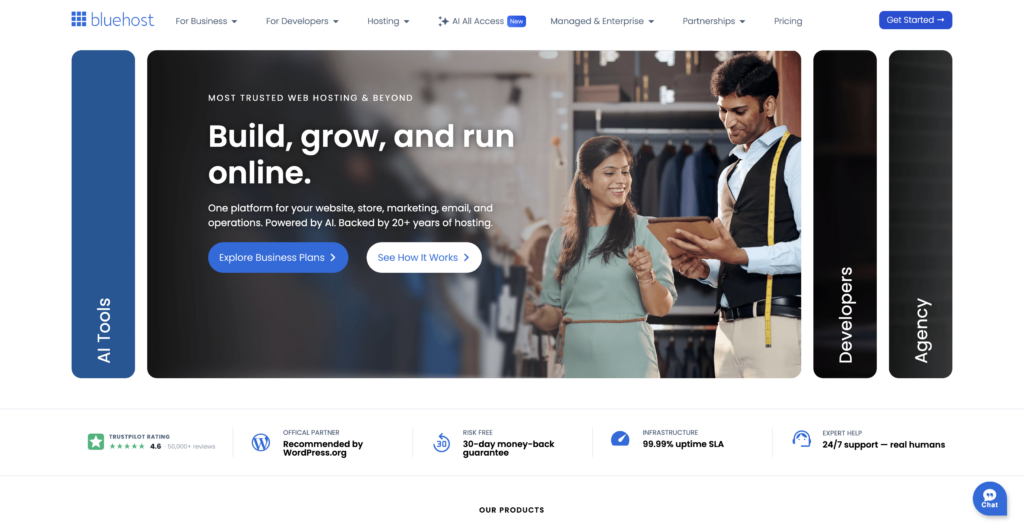
A popular option for beginners is Bluehost, known for its easy setup and smooth integration with WordPress. It allows you to create your blog without dealing with complicated technical steps, and in most cases, you can have everything ready within 20–30 minutes.
One reason many beginners choose Bluehost is that it is officially recommended by WordPress.org and is trusted by millions of websites worldwide. It also offers a 30-day money-back guarantee, which means you can try it without any real risk.
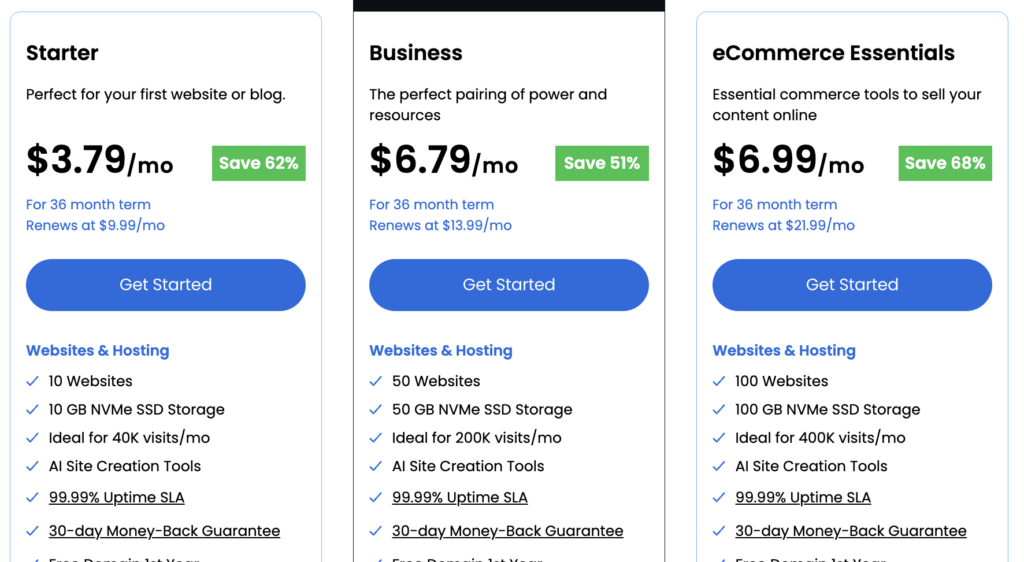
To get started, you’ll first need to choose a hosting plan. For beginners, the basic plan is usually more than enough. It includes essential features like hosting, a free domain name for the first year, and an SSL certificate to keep your site secure. As your blog grows, you always have the option to upgrade your plan later.
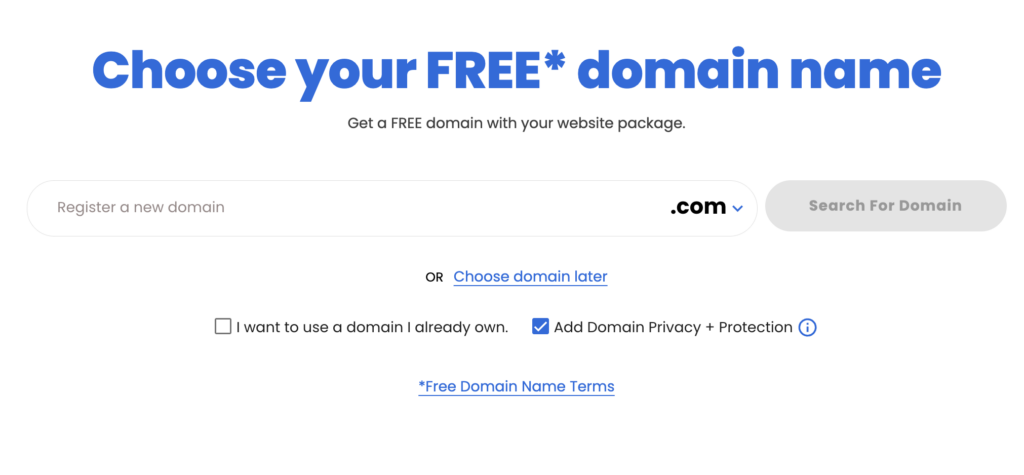
Next comes choosing your domain name, which is your blog’s address on the internet. This can be your personal name, your brand name, or anything that represents your blog’s purpose. With Bluehost, you get this domain free for the first year, which helps you save extra costs in the beginning.
Overall, this step is designed to be simple and beginner-friendly, so you can focus more on building your blog rather than worrying about technical setup. Once everything is configured, your blog will be live and ready for you to start publishing content.
What Is an SSL Certificate?
When learning how to start a blog in 2026, you’ll often hear about SSL certificates—and they’re very important for your website’s security. An SSL certificate protects the data shared between your website and your visitors. It encrypts information so that no one else can access or misuse it while it’s being transferred. To understand it simply, imagine sending a message. Without SSL, it’s like sending that message openly where anyone could read it. But with SSL, the message is secured and can only be accessed by the intended person.
For your blog, this means safer browsing for visitors, better trust, and even improved rankings on search engines. That’s why having an SSL certificate is essential when setting up your blog.
When choosing a domain while learning how to start a blog in 2026, keep it simple, short, and easy to remember. A clean and clear domain name helps people recall your blog and makes it easier to build a brand over time.
If your first choice isn’t available, don’t worry—you can try a different variation or skip this step for now by selecting the “choose domain later” option and decide on a name after setting up your hosting.
Also, pay attention during checkout. Some providers automatically select extra features like domain privacy protection. It’s useful, but make sure you review it before proceeding so you only pay for what you actually need.
What Is Domain Privacy Protection?
While learning how to start a blog in 2026, it’s important to understand what happens when you register a domain name. By default, your personal details—like your name, email, and contact information—can be listed in a public database (WHOIS), which anyone can access. Domain Privacy Protection helps keep this information safe. Instead of showing your real details, it replaces them with generic contact information provided by your domain registrar (such as your hosting company).
This adds an extra layer of privacy and helps protect you from spam, unwanted contact, or misuse of your personal information while running your blog.
As you go through the setup process while learning how to start a blog in 2026, you’ll notice some optional add-ons during checkout. Even though these features are clearly explained, they usually come with an extra cost. It’s completely your choice whether you want to include them—especially when it comes to privacy-related features, which can add an extra layer of protection.
Once you’ve reviewed everything, move ahead and complete your checkout.
The next step is to create your account. You can set a password manually for your hosting account, or choose a quicker option by signing up using services like Google, Apple, or GitHub. This makes the login process easier and helps you access your account without any hassle.
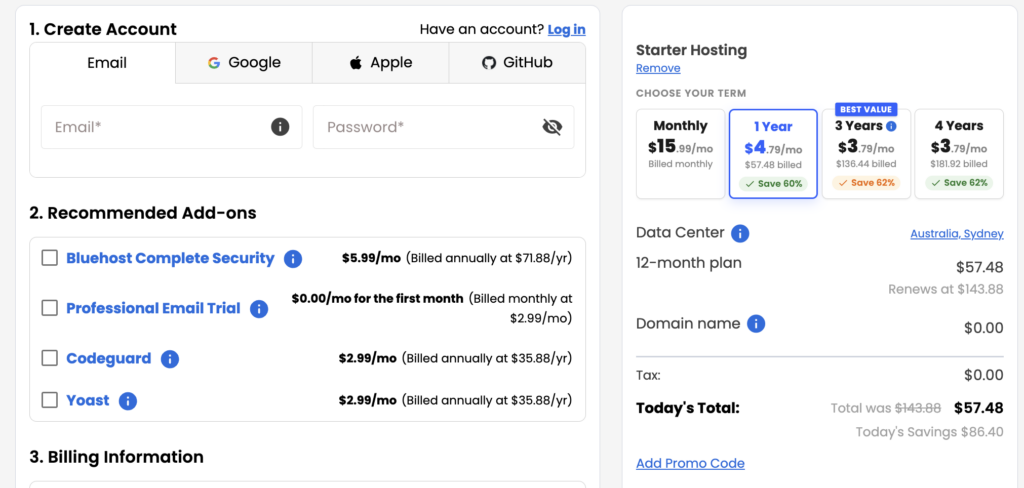
As you continue learning how to start a blog in 2026, the next step is selecting a hosting plan and finishing your purchase. Most hosting providers, including Bluehost, offer flexible pricing options depending on how long you want to commit.
You’ll usually see options like monthly, yearly, or multi-year plans. Longer plans often come with better discounts, which helps reduce your overall cost. For beginners who are serious about blogging, choosing a 1-year or 3-year plan is often the better value since it typically includes benefits like a free domain name and SSL certificate. Monthly plans may look easier to start with, but they usually cost more in the long run and may not include these extras.
Once you decide on a plan, go ahead and complete your purchase by entering your billing details. Before making the payment, take a moment to review the terms and any optional add-ons so you only select what you actually need. After confirming everything, submit your payment.
After a successful purchase, your hosting account will be activated. You’ll receive important details like your login credentials via email, so make sure to check your inbox. In most cases, WordPress will start installing automatically, or you’ll be guided through a simple setup process where you just need to answer a few basic questions.
Once that’s done, you can log in to your hosting dashboard and access your WordPress site. From here, your blog is officially set up and ready for customization.
If you run into any issues during this process, Bluehost provides customer support and helpful guides to assist you. Don’t hesitate to use those resources—they’re there to make your journey smoother as you move forward with how to start a blog in 2026.
Step 5: Get Started with WordPress
Now that your setup is complete, it’s time to move forward with how to start a blog in 2026 by working inside WordPress and building your blog the way you want.
At this stage, you’ll have two different login details to keep in mind. One is for your hosting account (like Bluehost), which you’ll use to manage your hosting settings, billing, and website access. The second is your WordPress login, which is used to enter your blog’s dashboard—this is where all the real work happens.
You should have received a welcome email after setup that includes all your login information, so make sure to check and save it for future use.
Most of your time will be spent inside the WordPress dashboard. This is your control panel where you can:
- Create and publish blog posts
- Upload images and media
- Customize your website design
- Add plugins to extend your blog’s features
To access your site through your hosting account, simply log in and go to the “My Sites” section, where you’ll find your WordPress website. From there, you can manage everything easily.
You can also directly open your dashboard by typing yourdomain.com/wp-admin in your browser and logging in with your WordPress username and password.
Once you’re inside, you’re officially ready to start creating content and growing your blog—this is where your journey of how to start a blog in 2026 truly begins.
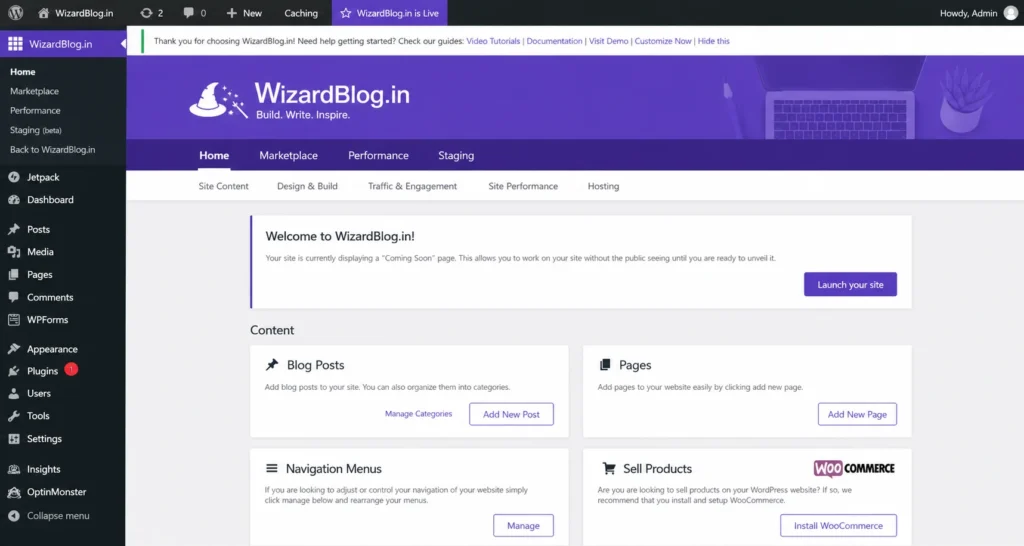
At first, the WordPress dashboard might look a bit confusing, but once you start exploring, you’ll realize it’s quite simple to use. When learning how to start a blog in 2026, the key is to take things step by step instead of trying to understand everything at once.
To get more comfortable, it’s a good idea to go through a beginner-friendly WordPress guide so you understand how everything works.
For now, let’s focus on the basics. Head over to Settings → General in your dashboard. This is where you can set important details like your site title, tagline, and other essential information to make sure your blog is set up correctly from the beginning.
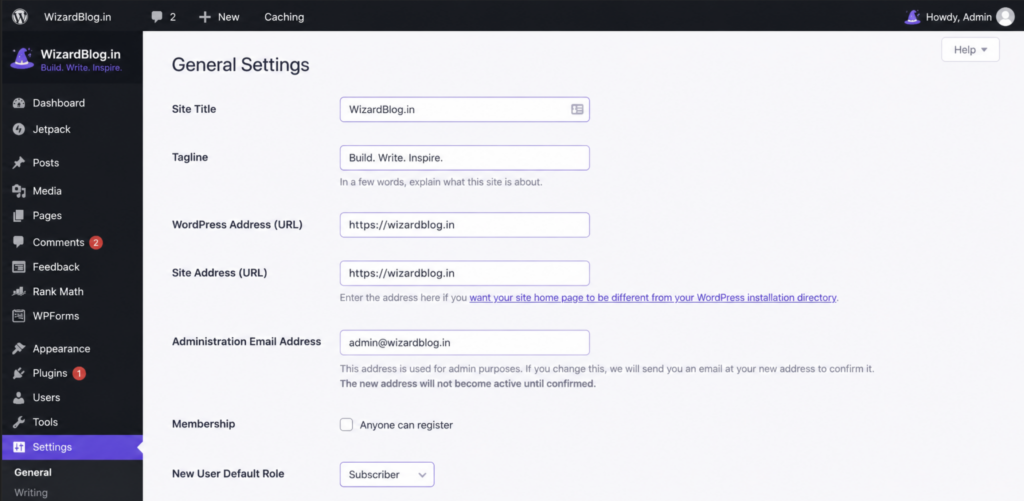
As you continue learning how to start a blog in 2026, setting up the right WordPress settings is essential to make sure your blog runs smoothly from day one.
Start with Site Title and Tagline. Your site title should clearly represent your blog name, and the tagline should briefly explain what your blog is about or your mission. Don’t worry—you can update these anytime as your blog evolves.
Next, check your Site Address (URL). Make sure it begins with https:// instead of http://. This means your site is secure with SSL, which is important for both user trust and SEO. If it’s not set correctly, your hosting provider can usually help you fix it quickly.
For the Admin Email, ensure you’re using an active and accessible email address. This is where you’ll receive important notifications. If you change it, you’ll need to confirm the new email before it becomes active.
Under Membership, you can leave it unchecked if you don’t plan to allow user registrations on your blog. Most beginners don’t need this feature at the start.
Then, adjust your Timezone and Date settings according to your location. This becomes especially important if you plan to schedule posts, as it ensures your content is published at the correct time.
After that, go to Settings → Permalinks and select the “Post name” option. This creates clean and readable URLs for your blog posts, which are better for both users and search engines.
Don’t forget to click Save Changes after updating any settings.
Install Essential Plugins
To improve your blog’s performance and visibility, installing the right plugins is important. A great starting point is the Yoast SEO plugin. It helps you optimize your content for search engines, making it easier for people to find your blog on platforms like Google.
By setting up these basics properly, you’ll build a strong foundation as you move forward with how to start a blog in 2026.
What Are WordPress Plugins?
WordPress plugins are tools that extend the functionality of your website. They allow you to add new features to your blog without needing any coding knowledge. With plugins, you can enhance your site in many ways—such as adding contact forms, creating image galleries, improving website speed, optimizing for SEO, setting up online stores, and much more.
In simple terms, plugins help you customize and grow your blog based on your needs, making them an essential part of building a successful WordPress site.
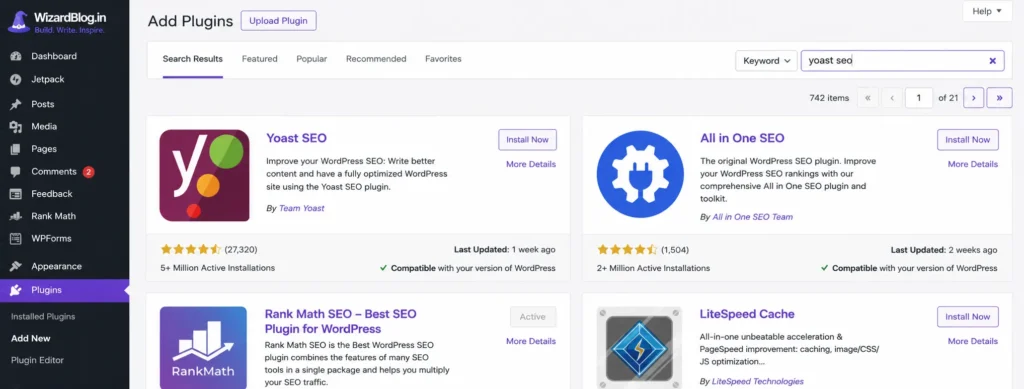
How to Install WordPress Plugins
As you continue learning how to start a blog in 2026, installing plugins is one of the easiest ways to add powerful features to your site.
To install a plugin, go to your WordPress dashboard and navigate to Plugins → Add New. In the search bar, type the name of the plugin you want—for example, Yoast SEO. Once it appears, click Install Now, and after installation, click Activate to start using it.
For beginners, a few essential plugins can make a big difference. The Yoast SEO plugin helps you optimize your content so it ranks better on search engines. For security, you can install Wordfence Security, which protects your blog from threats and unauthorized access. To allow visitors to contact you easily, Contact Form 7 is a simple and reliable option for adding contact forms.
The good thing is that most plugins come with their own setup instructions, so you can follow them step by step without any confusion. This makes plugin installation a simple but powerful part of building your blog.
Step 6: Customize and Launch Your Blog
Now that your blog is set up, it’s time to design it your way—an important part of learning how to start a blog in 2026.
What Are WordPress Themes?
WordPress themes are what define the overall look and design of your blog. They control how your website appears to visitors, including the layout, colors, fonts, and visual style.
With a theme, you can customize different design elements such as your header, background, menus, and widget areas without needing any coding skills. It helps you create a professional and attractive blog that matches your brand or niche.
In simple terms, while WordPress handles your content, a theme is what gives your blog its unique appearance.
You can change your blog’s design by installing a new theme. Simply go to Appearance → Themes → Add New in your WordPress dashboard. From there, you can browse free themes or search for one that fits your style. If you’ve purchased a premium theme, you can also upload it directly from this section.
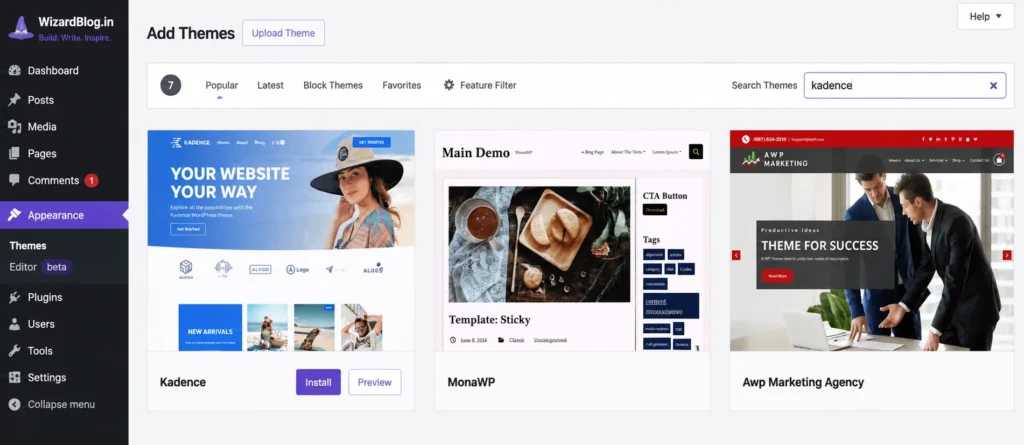
One popular option is Kadence Theme. It’s lightweight, fast, and works smoothly across all devices like desktops, mobiles, and tablets. The free version is powerful enough for most beginners, while the premium version offers more advanced customization features if you need them later.
Another great alternative is Astra Theme, which also provides flexibility, speed, and a wide range of design options.
After selecting your theme, go to Appearance → Customize. This is where you can adjust your blog’s layout, colors, fonts, header, and other design elements in real time. You’ll be able to see changes instantly, which makes it easy to create a professional-looking blog without any technical skills.
Once you’re happy with the design, your blog is ready to go live. This step brings everything together and moves you closer to successfully launching your site as you continue your journey of how to start a blog in 2026.
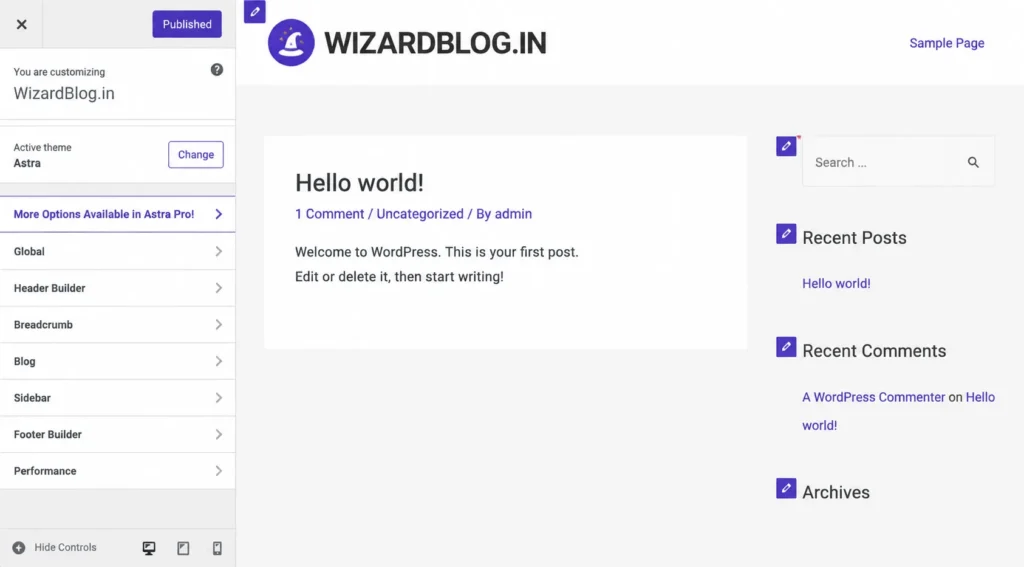
As you move ahead with how to start a blog in 2026, this is where your blog truly begins to take shape. WordPress makes customization simple, so you can design your site exactly the way you want—without writing a single line of code.
You can update your header by adding your logo and navigation menu, adjust your blog layout, place useful widgets in the sidebar, and customize the footer section to match your style and brand.
At first, everything might feel new and a bit confusing—and that’s completely normal. Every blogger goes through this stage. The best approach is to explore slowly, test different settings, and learn as you go. With a little practice, it all starts to feel easy.
Once your design looks good, it’s time to focus on content. Start writing your first blog post, even if you’re unsure. Pick a topic related to your niche and begin—progress matters more than perfection.
If you feel stuck, you can always follow a beginner-friendly writing guide to understand how to structure and publish your first post properly.
To create a new post, go to the Posts section in your dashboard and click on Add New. From there, you can start writing, formatting, and publishing your content.
This is the step where your journey of how to start a blog in 2026 truly becomes real—because now, you’re not just setting up a blog, you’re actually building it.
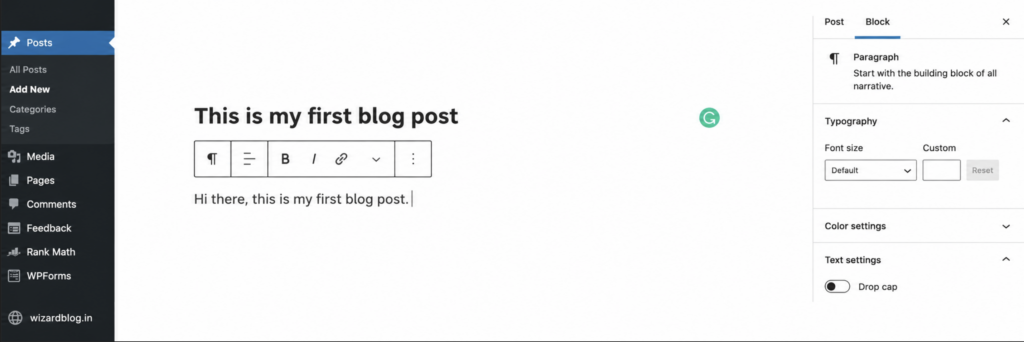
As you continue learning how to start a blog in 2026, remember that your content doesn’t need to be perfect from the beginning. You can always go back and edit, update, and improve your blog posts anytime, so focus on getting started rather than overthinking.
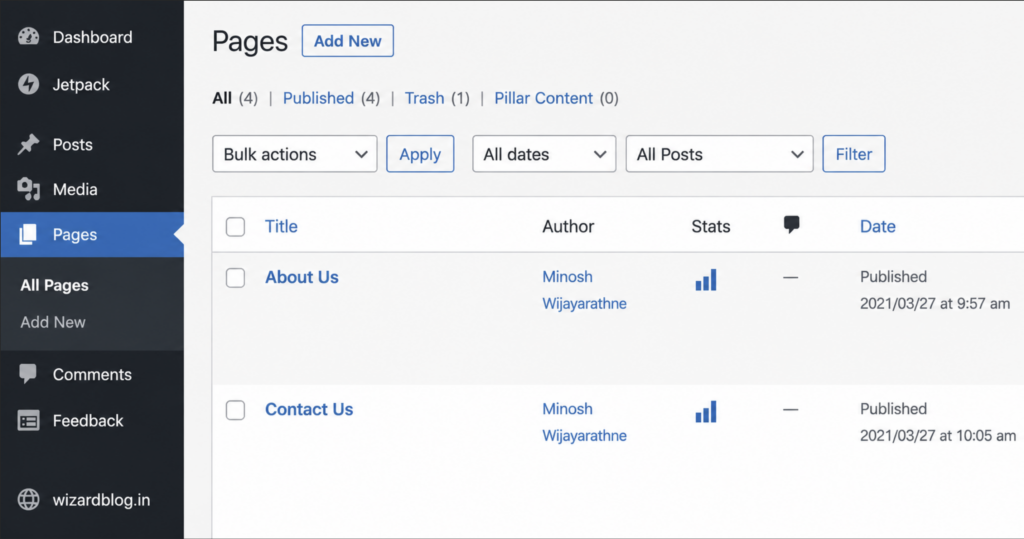
Along with blog posts, it’s important to create a few essential pages that build trust and professionalism. To add a new page, simply go to Pages → Add New in your WordPress dashboard.
Some important pages every blog should have include an About Page to introduce yourself or your brand, a Contact Page so visitors can reach you, and legal pages like a Disclaimer, Privacy Policy, and Terms of Service. These pages help keep your blog transparent and trustworthy for your audience.
Setting up these basics properly will strengthen your foundation as you move forward with how to start a blog in 2026.
As you move closer to completing how to start a blog in 2026, you might find it a bit difficult to create legal pages on your own—and that’s completely normal. To make things easier, you can use tools like CookieYes to quickly generate pages like a Privacy Policy, which you can simply copy and add to your blog.
Now that everything is almost ready, it’s time to launch your blog. But before going live, there’s one small step you shouldn’t miss—removing the “coming soon” page set by your hosting provider.
Here’s what you need to do:
First, log in to your WordPress dashboard by visiting yourdomain.com/wp-admin. Then go to Settings → General and scroll down until you find the “Coming Soon” option provided by Bluehost. Turn this option off and click Save Changes.
Once that’s done, open your website in a new browser tab and enter your domain name. You’ll now see your live blog exactly as visitors will see it.
And that’s it—you’re officially live! 🎉
Your blog is now ready to be shared with the world. You’ve successfully set up a self-hosted WordPress blog, which is one of the most powerful and flexible ways to build an online presence.
What Next After Starting Your Blog?
Now that you’ve learned how to start a blog in 2026, the next step is to focus on what truly matters—creating valuable content and growing your audience.
In the beginning, don’t overcomplicate things. Write in your own natural style and improve as you go. Blogging is a skill that gets better with practice. Try different content formats, experiment with topics, and see what your audience responds to the most.
It’s also helpful to study other blogs in your niche. This gives you a clear idea of what your target audience is looking for and how you can create content that stands out.
To bring traffic to your blog, start sharing your posts on platforms like Pinterest. It’s one of the best sources of free traffic for bloggers, especially beginners.
Many new bloggers rush into monetization, but the real priority should be building useful and engaging content first. Once your blog starts attracting consistent traffic, you can explore earning opportunities. Platforms like Journey by Mediavine make it easier for beginners to start earning while still growing their blog.
At the same time, set up essential tools to track your progress. Google Analytics helps you understand your visitors, traffic sources, and overall performance. Along with that, Google Search Console shows how your blog appears in search results and helps you improve your visibility on Google.
If you ever face technical issues, your hosting provider’s support team is always there to help. You can also explore the WordPress community forums to find answers and learn more about themes and plugins.
Now it’s your turn—take action and apply everything you’ve learned about how to start a blog in 2026. The sooner you begin, the faster you’ll grow.
Happy blogging 🚀


Hi, this is a comment.
To get started with moderating, editing, and deleting comments, please visit the Comments screen in the dashboard.
Commenter avatars come from Gravatar.