If you’re searching for a Bluehost review based on real-world testing rather than marketing claims, you’re in the right place. For this review, I explored Bluehost from the perspective of an actual website owner—setting up a new website, testing hosting performance, monitoring uptime, evaluating customer support, and examining the platform’s key features.
Rather than relying on promotional material, I focused on hands-on experience to understand how Bluehost performs in everyday use. This review covers both the strengths and weaknesses of the service, including website speed, reliability, ease of use, pricing, support quality, and overall value for money.
Whether you’re starting a blog, building a business website, or launching an online store, this guide will help you determine if Bluehost is the right hosting provider for your needs. Let’s dive into the details and see how Bluehost performs in 2026.
Bluehost Hosting Review
Overall Rating: 4.4/5 ⭐
Bluehost remains one of the most popular hosting providers for beginners, thanks to its affordable pricing, easy WordPress integration, and user-friendly website management tools. The platform is designed to help new website owners get online quickly without dealing with complicated technical settings.
During testing, Bluehost delivered reliable performance for blogs, business websites, and smaller projects. The custom hosting dashboard makes managing websites straightforward, while access to advanced hosting controls provides additional flexibility when needed. Website loading speeds were generally consistent under normal traffic conditions, making Bluehost a solid choice for personal and small business websites.
However, websites experiencing significant traffic growth may eventually require more powerful hosting resources. Under heavier workloads, performance can become less consistent compared to premium managed WordPress hosting providers.
User Ratings
| Category | Rating |
|---|---|
| Reliability | ⭐⭐⭐⭐☆ |
| Ease of Use | ⭐⭐⭐⭐⭐ |
| Performance | ⭐⭐⭐⭐☆ |
Bluehost is an excellent option for beginners, bloggers, freelancers, and small business owners who want a reliable hosting provider without a steep learning curve. It combines affordability, simplicity, and solid everyday performance, making it a strong starting point for most WordPress websites. While larger and high-traffic projects may eventually outgrow shared hosting plans, Bluehost continues to offer excellent value for users launching and growing their online presence.
Bluehost at a Glance
| Feature | Details |
|---|---|
| Average Loading Speed | Fast response times across multiple regions, with tests showing approximately 0.22s in the US, 0.36s in Europe, and 0.18s in Asia. |
| Uptime Reliability | Consistently maintained 100% uptime during the monitoring period, demonstrating strong server stability. |
| Highlights | Allows users to host multiple websites even on entry-level plans, includes a free domain for the first year, and is suitable for growing websites with moderate traffic levels. |
| Customer Support | 24/7 assistance available through live chat, phone support, and ticket-based support channels. |
| Core Features | SSD-powered storage, automatic website backups, built-in caching technology, free SSL certificates, and malware protection tools. |
| Website Management Tools | One-click WordPress setup, beginner-friendly custom dashboard, cPanel access, and AI-powered website creation features. |
| Starting Price | Hosting plans begin at an affordable monthly rate, with email hosting included through the hosting control panel. |
| Ideal Users | Best suited for beginners, bloggers, freelancers, and small businesses looking for an easy-to-manage hosting solution with strong WordPress compatibility. |
Bluehost combines affordability, ease of use, and dependable performance, making it one of the most beginner-friendly hosting providers available. With fast loading speeds, excellent uptime, built-in security features, and multiple website support, it offers a solid foundation for launching blogs, business websites, portfolios, and other WordPress-powered projects.
Bluehost Features Overview: What Do You Get?

Before diving into performance, pricing, and support, it’s helpful to understand what Bluehost includes with its hosting plans. The platform offers a combination of beginner-friendly tools, website management features, security options, and performance enhancements that make it a popular choice for WordPress users.
Below is a quick overview of the most notable Bluehost features:
- Easy WordPress Setup : Bluehost simplifies the website creation process with a guided WordPress installation wizard. New users can launch a website in just a few steps without dealing with complicated server configurations or manual installations.
- User-Friendly Hosting Dashboard : The custom Bluehost dashboard is designed to make website management straightforward. From a single control panel, you can manage domains, hosting settings, backups, security tools, and WordPress websites with ease.
- cPanel Access : For users who need more advanced controls, Bluehost also provides access to cPanel. This allows you to manage email accounts, databases, files, domains, and other technical hosting settings through a familiar interface.
- Multiple Website Hosting : Depending on your hosting package, Bluehost allows you to host multiple websites under a single account. Entry-level plans support several websites, while higher-tier plans can accommodate much larger website portfolios.
- High-Speed NVMe SSD Storage : Bluehost uses fast SSD-based storage to improve website responsiveness and loading times. Storage allocations vary by plan, giving users flexibility based on their website requirements.
- AI-Powered Website Creation Tools : For users who want to build a website quickly, Bluehost includes AI-assisted design tools. These features help generate layouts, templates, and design suggestions that can be customized to fit your brand and content.
- Website Backup Options : Keeping regular backups is essential for website security. Bluehost offers automated backup solutions that help protect your website data and simplify recovery if unexpected issues occur. Some advanced backup services may require additional fees depending on the hosting plan.
- Built-In Performance Optimization : To improve website speed, Bluehost includes server-level caching technology. This helps reduce page load times and can improve the overall browsing experience without requiring additional performance plugins.
- Free SSL Certificate : Security is included with a complimentary SSL certificate, helping encrypt visitor data and improve website trustworthiness. SSL protection is also an important factor for search engine optimization and online credibility.
- Global Content Delivery Network (CDN) : Bluehost integrates with Cloudflare CDN services, allowing website content to be delivered through a worldwide network of servers. This can improve loading speeds for visitors regardless of their geographic location.
- Staging Environment : Website owners can create staging versions of their websites to test updates, design changes, or new features before applying them to the live site. This reduces the risk of errors affecting visitors.
- Professional Email Hosting : Most Bluehost plans include the ability to create custom email addresses using your domain name. This feature helps businesses maintain a more professional online presence without requiring a separate email hosting provider.
- Website Security Features : Bluehost offers malware scanning, website monitoring, and additional security services designed to protect websites from common online threats. Some advanced security tools may be available as premium upgrades.
- WooCommerce Support for Online Stores : Users planning to launch an eCommerce website can take advantage of Bluehost’s WooCommerce-compatible hosting plans. Certain packages include premium WooCommerce extensions and tools that help simplify online store management and enhance selling capabilities.
User Experience and Setup Process
One of Bluehost’s biggest advantages is how easy it is to use, especially for beginners who are creating their first website. The platform is designed to simplify the entire website-building journey, from signing up for hosting to launching a fully functional WordPress site.
Unlike some hosting providers that overwhelm users with technical settings, Bluehost focuses on a guided experience that helps you get online quickly. The onboarding process walks you through the essential setup steps, making it easy to connect a domain, install WordPress, and start customizing your website.
Because ease of use is one of Bluehost’s standout strengths, it’s worth taking a closer look at the key areas that shape the overall user experience. In the following sections, we’ll explore the account dashboard, WordPress installation process, website management tools, and other features that make Bluehost a popular choice for beginners and small business owners.
WordPress Installation and Website Setup Process
Setting up a WordPress website for the first time can seem overwhelming, especially if you’re unfamiliar with web hosting and website management. Fortunately, Bluehost simplifies the process with a beginner-friendly setup system that removes much of the technical complexity.
After purchasing a hosting plan, creating a new website is straightforward. From the Bluehost dashboard, simply navigate to the Websites section and select the option to create a new site. Bluehost then launches a guided setup wizard that walks you through each stage of the installation process.
During setup, you’ll be asked to enter basic information such as your website name, preferred domain, and WordPress login details. Bluehost automatically handles the server configuration, WordPress installation, and other technical requirements behind the scenes, allowing you to focus on building your website rather than managing hosting settings.
Once the installation is complete, your new WordPress site is ready to use. You can immediately access the WordPress dashboard, choose a theme, install plugins, create pages, and begin publishing content.
One of Bluehost’s biggest strengths is how simple it makes the website launch process. Even users with no previous WordPress experience can have a fully functional website up and running within a matter of minutes. This ease of use is one of the reasons Bluehost remains a popular hosting choice for bloggers, entrepreneurs, and small business owners.
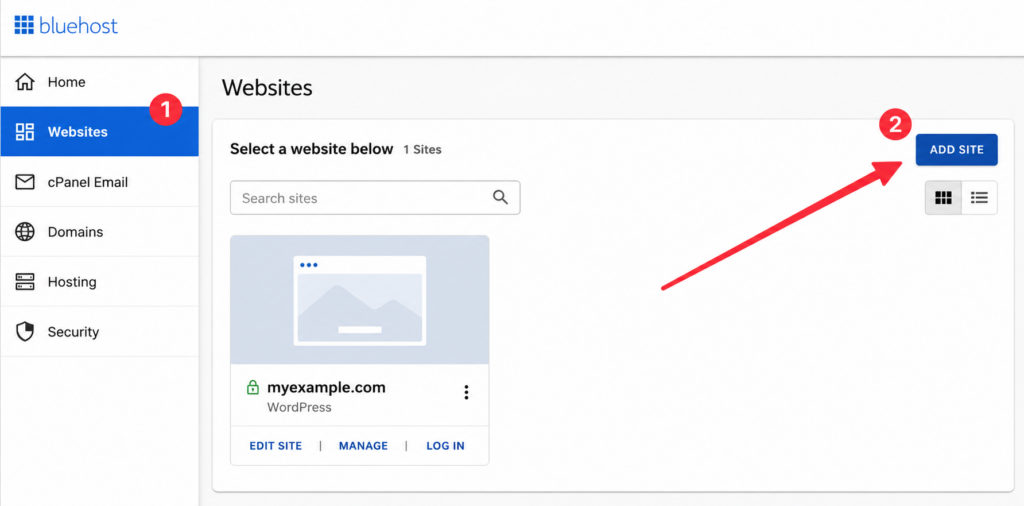
As part of the setup process, Bluehost gives you the option to either migrate an existing website or start fresh with a brand-new WordPress installation. Once you’ve made your selection, the platform guides you through a few simple setup steps, including entering basic details such as your website title and other essential preferences.
The process is designed to be beginner-friendly, so you won’t need to worry about technical configurations or server settings. Bluehost handles the installation in the background, allowing you to focus on getting your website ready for launch.
After the setup is complete, your newly created website will appear in the Bluehost dashboard. From there, you can access your WordPress admin area, manage website settings, install themes and plugins, and begin creating content right away.
Bluehost Hosting Dashboard
After your website is up and running, Bluehost provides a dedicated hosting dashboard that makes managing your WordPress site simple and efficient. The interface is designed to give users quick access to the most important website management tools without requiring advanced technical knowledge.
From the main dashboard, you can easily navigate to essential sections such as website security, backups, performance settings, plugins, user management, and other site configuration options. Everything is organized in a way that helps you monitor and maintain your website from a single location.
Whether you need to update plugins, manage user accounts, review security settings, or optimize your site’s performance, Bluehost keeps these tools readily accessible. This streamlined approach makes day-to-day website management easier for beginners while still providing enough functionality for more experienced users.
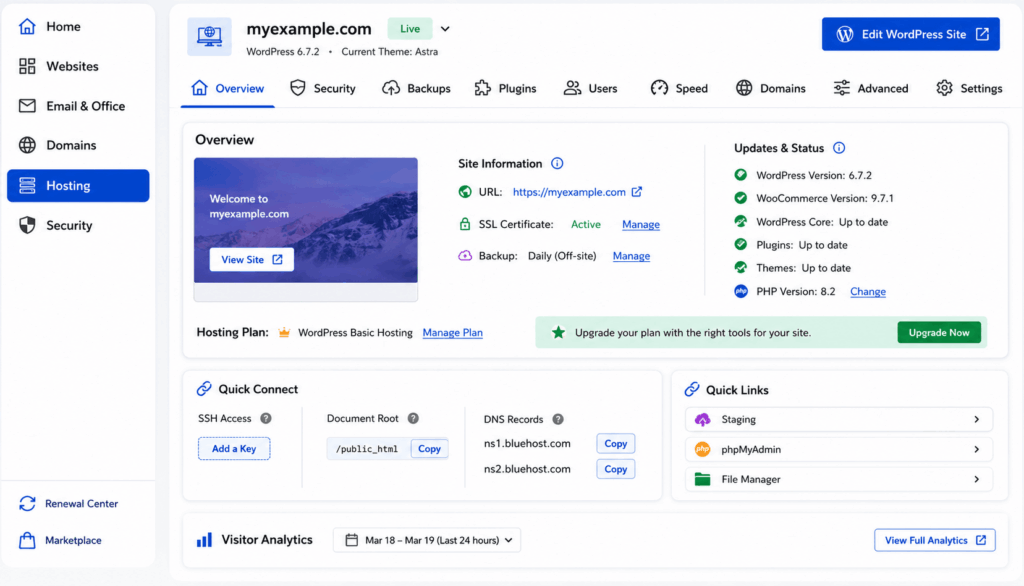
One particularly useful section of the Bluehost dashboard is the Speed area, which is designed to help optimize your website’s performance. From this section, users can manage built-in caching features that reduce page load times and improve overall site responsiveness. Bluehost also provides access to Cloudflare integration, allowing you to connect your website to a global content delivery network (CDN). Together, these performance tools help deliver content more efficiently to visitors and contribute to a faster, smoother browsing experience across different locations.

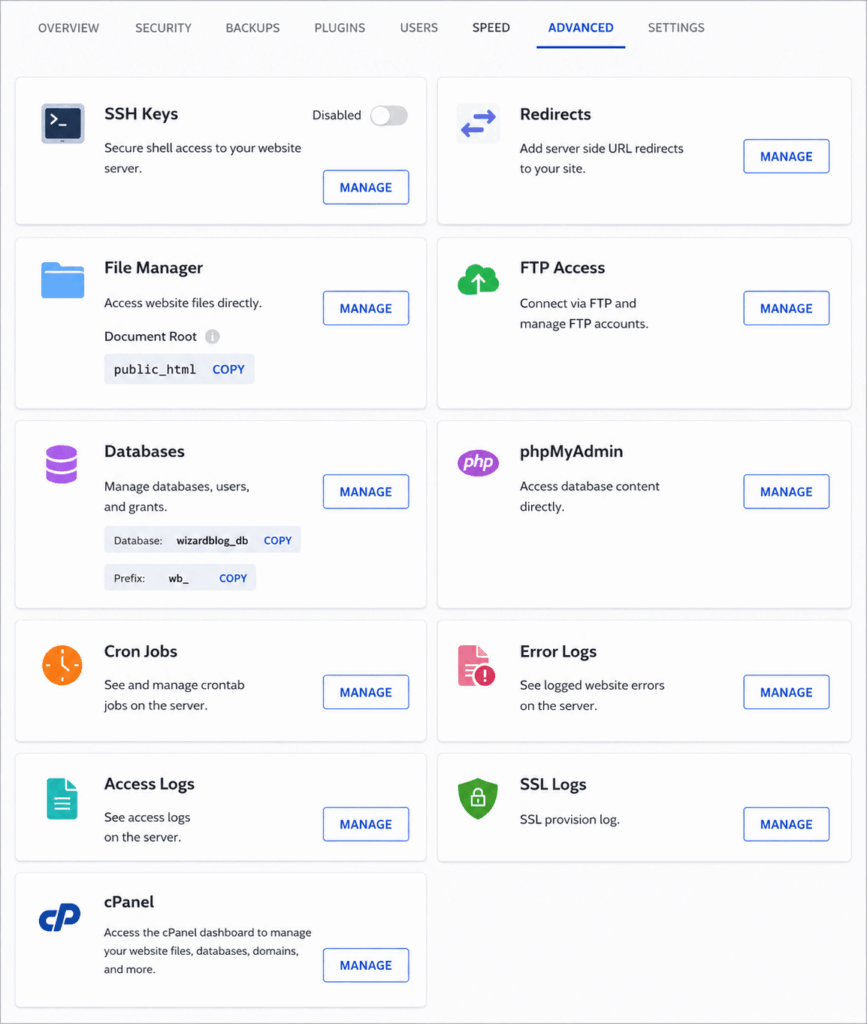
The Advanced tab includes some helpful tools, such as a redirect manager.
cPanel Access and Advanced Website Management
Although Bluehost provides its own modern hosting dashboard, users still have access to the traditional cPanel interface for more advanced website management tasks. This gives website owners the flexibility to use either Bluehost’s simplified dashboard or the powerful tools available within cPanel.
Through cPanel, you can perform a wide range of administrative tasks, including managing website files, creating and editing databases, configuring email accounts, handling domain settings, monitoring server resources, and much more. Popular tools such as File Manager, phpMyAdmin, backup utilities, and security settings are all available from a single location.
One of the biggest advantages of cPanel is that it allows users to manage complex hosting functions through a visual interface rather than requiring command-line knowledge or advanced technical skills. This makes it easier for beginners to perform important website maintenance tasks while still offering the flexibility that experienced users often need.
To access cPanel, simply navigate to the Advanced section of your Bluehost hosting dashboard and select the Manage option next to cPanel. From there, you’ll gain access to a comprehensive collection of tools designed to help you manage every aspect of your hosting account and website environment.
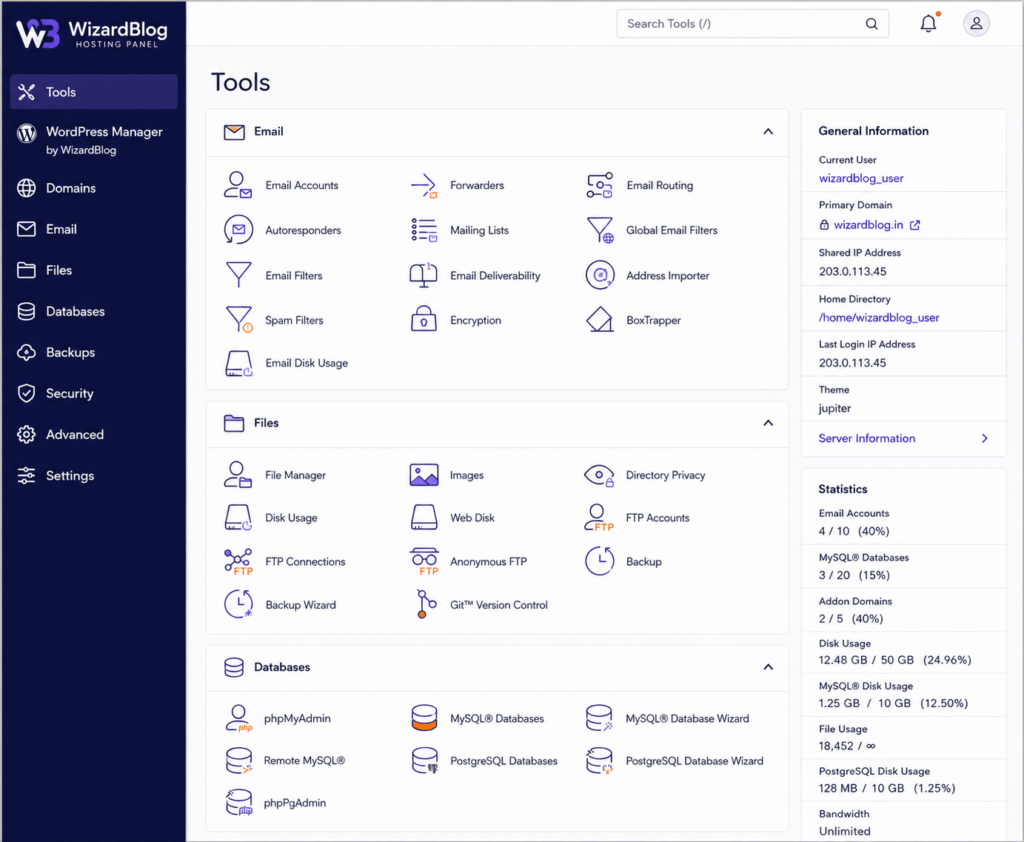
Overall, Bluehost delivers a smooth and easy-to-navigate hosting experience that caters well to beginners. The custom dashboard is designed to simplify website management, making it easy to handle tasks such as domain settings, WordPress administration, security configurations, and performance monitoring from a single location.
Even users with little to no technical experience can quickly find the tools they need, which is one of Bluehost’s biggest strengths. Considering its affordable pricing, the platform offers a well-balanced combination of simplicity, functionality, and convenience for new website owners.
Performance, Speed, and Uptime
Website hosting has a direct impact on how fast your pages load and how reliably your site stays online. A responsive website not only improves the visitor experience but can also influence search rankings, engagement, conversion rates, and overall business growth.
For website owners who rely on traffic, leads, or online sales, hosting performance becomes even more important. Faster websites tend to keep visitors engaged longer and can contribute to better results across multiple areas of your online presence.
To evaluate Bluehost fairly, the WizardBlog team tested the platform using a live WordPress website and monitored its performance over time. We tracked key metrics such as page loading speed, server response consistency, and uptime to understand how Bluehost performs in real-world conditions.
Rather than relying solely on marketing claims, our review is based on practical testing and ongoing monitoring. This approach helps provide a clearer picture of what users can realistically expect when hosting a website with Bluehost.
To measure Bluehost’s real-world performance, we monitored a live website and tested loading speeds from multiple locations around the world. The results show that Bluehost delivers consistently fast response times across major regions, making it a reliable choice for most personal and small business websites.
Bluehost Loading Speed Results
| Test Location | Average Load Time |
|---|---|
| East Coast, USA | 0.13s ⭐ |
| West Coast, USA | 0.25s ⭐ |
| Central USA | 0.29s ⭐ |
| London, UK | 0.26s ⭐ |
| Paris, France | 0.46s ⭐ |
| Mumbai, India | 0.18s ⭐ |
These numbers indicate strong global performance, with particularly impressive speeds in North America and Asia. Most visitors should experience quick page loads, which can help improve user engagement and overall website performance.
Bluehost Uptime Results
| Month | Uptime |
| March 2026 | 100.00% ⭐ |
| April 2026 | 100.00% ⭐ |
| May 2026 | 100.00% ⭐ |
During our monitoring period, Bluehost maintained perfect uptime, meaning the test website remained accessible without interruptions. Consistent uptime is essential for businesses, bloggers, and online stores that depend on website availability.
Based on our testing, Bluehost offers dependable speed and stability for most standard websites, including blogs, portfolio sites, business websites, and informational projects. Its infrastructure is more than capable of handling everyday traffic levels while maintaining a smooth browsing experience.
That said, websites that receive significant traffic volumes or run resource-intensive applications—such as large WooCommerce stores, membership communities, or high-growth content platforms—may benefit from a hosting provider that specializes in advanced WordPress performance optimization.
For beginners, freelancers, and small businesses, Bluehost provides a solid balance of speed, reliability, and affordability, making it a practical choice for launching and growing a website.
Customer Support
Reliable customer support can make a big difference, especially for beginners who may need assistance setting up or managing their websites. Bluehost provides round-the-clock customer support across most of its hosting plans, along with a variety of self-service resources to help users find answers quickly.
Customers can reach the support team through several channels, including live chat, email/ticket support, and phone support on eligible plans. Bluehost also offers an AI-powered assistant and an extensive knowledge base filled with tutorials, guides, and troubleshooting articles for common hosting and WordPress issues.
One advantage is the availability of phone support, which has become less common among many budget-friendly hosting providers. This can be particularly helpful for users who prefer speaking directly with a support representative rather than relying solely on chat-based assistance.
Based on our experience, Bluehost’s support team is generally responsive, courteous, and capable of resolving most routine issues such as WordPress setup, domain configuration, email management, and account-related questions. For more technical problems, requests may occasionally need to be escalated to specialized support staff, which can increase resolution times. However, this is fairly standard among hosting providers in the same price range.
Overall, Bluehost delivers dependable customer support that should meet the needs of most bloggers, small businesses, and first-time website owners. While premium managed hosting companies may offer faster access to advanced technical specialists, Bluehost provides a solid support experience that aligns well with its affordable hosting plans.
Bluehost Plans and Pricing
One of Bluehost’s strongest selling points is its affordability, making it a popular choice for beginners, bloggers, and small business owners who want to launch a website without a large upfront investment. The shared hosting plans are competitively priced and include many of the essential features needed to get a website online.
Bluehost frequently offers discounted introductory rates for new customers, allowing users to secure hosting at a lower monthly cost when choosing longer-term billing periods. These promotional offers can provide significant savings during the initial subscription term, making Bluehost an attractive option for budget-conscious website owners.

However, it’s important to understand that introductory pricing is temporary. Once the initial hosting term expires, plans renew at the standard rate, which is typically higher than the promotional price. For this reason, website owners should consider both the initial cost and the long-term renewal pricing when comparing hosting providers.
Bluehost offers several hosting tiers designed to accommodate different website needs. Entry-level plans are suitable for personal blogs, portfolios, and small websites, while higher-tier packages include additional resources, enhanced performance features, advanced security options, and support for multiple websites.
Overall, Bluehost delivers solid value for money by combining affordable introductory pricing with a beginner-friendly hosting environment, WordPress integration, free SSL certificates, and useful website management tools. Before making a final decision, it’s worth comparing the available plans to determine which package best aligns with your website goals and future growth requirements.
Additional Costs and Optional Bluehost Add-Ons
When comparing Bluehost hosting plans, it’s important to look beyond the advertised monthly price and consider any additional costs that may apply over time. Understanding these expenses can help you estimate the true long-term cost of running your website.
Many Bluehost hosting plans include a free domain name for the first year, which is a valuable perk for new website owners. Once the promotional period ends, however, you’ll need to renew your domain registration annually.
Another consideration is domain privacy protection. This service helps keep your personal contact details hidden from public domain records. While some domain registrars include privacy protection at no extra charge, it may involve an additional fee depending on where your domain is managed.
For users who want a simple setup experience, registering a domain through Bluehost can be convenient because everything is managed under one account. More experienced users may choose a separate domain registrar if they prefer additional flexibility or different pricing structures.
Bluehost includes core hosting features, but some advanced website protection tools are available as optional upgrades.
These may include:
- Automated website backup services
- Advanced malware monitoring
- Website security and protection tools
- Enhanced recovery options
For small blogs and business websites, the built-in security features are often sufficient. However, website owners who manage critical business data, customer information, or online stores may prefer additional protection for greater peace of mind.
Bluehost provides free SSL certificates with its hosting plans, allowing websites to use secure HTTPS connections without extra cost. This level of protection is suitable for most personal, business, and WordPress websites.
Because basic SSL coverage is already included, most users will not need to purchase premium SSL upgrades unless they have specialized security requirements.
Bluehost also offers access to various marketing and website optimization tools. Depending on your needs, you may choose to purchase premium SEO, analytics, or business growth solutions that extend the functionality of your website.
These tools are entirely optional but can be beneficial for website owners focused on improving search visibility, traffic growth, and online marketing performance.
Bluehost offers a flexible hosting environment that allows users to customize their services according to their requirements. While the entry-level hosting plans provide excellent value, it’s important to review optional add-ons during checkout so you understand which services are included and which may increase your total cost.
For most beginners, bloggers, and small businesses, the standard hosting package will provide everything needed to get started. As your website grows, you can choose additional backup, security, or marketing features based on your specific goals and budget.
Bluehost Pros and Cons
Bluehost Pros and Cons
Before choosing Bluehost, it’s helpful to compare its strengths and weaknesses. While Bluehost offers excellent value for beginners and small businesses, there are a few limitations that potential users should keep in mind.
| Pros | Cons |
|---|---|
| Beginner-friendly dashboard that simplifies website management. | Renewal rates are higher than the introductory promotional pricing. |
| Quick and easy WordPress installation with guided setup tools. | Some advanced backup and security features require additional purchases. |
| Strong uptime record that helps keep websites available to visitors. | Shared hosting performance may be less consistent during heavy traffic periods. |
| Free domain name for the first year on eligible hosting plans. | Domain privacy protection may involve an extra annual cost. |
| Free SSL certificate included with hosting plans. | Certain premium tools and add-ons can increase the overall hosting cost. |
| Access to both a custom Bluehost dashboard and traditional cPanel. | Not the best option for websites requiring enterprise-level performance. |
| Supports multiple websites on many hosting plans. | Advanced developers may prefer hosting providers with greater server customization. |
| Built-in performance tools such as caching and Cloudflare integration. | Some entry-level plans have fewer support options compared to higher-tier packages. |
| 24/7 customer support through chat, email, and phone on eligible plans. | Website migration and premium support services may require additional fees. |
| Suitable for blogs, business websites, portfolios, and small online stores. | Large WooCommerce stores and high-traffic websites may eventually need more powerful hosting solutions. |
Bluehost is an excellent choice for beginners, bloggers, freelancers, and small businesses that want affordable hosting with easy WordPress integration and reliable day-to-day performance. While it may not offer the advanced optimization and scalability required by larger projects, it provides a strong balance of usability, features, and value for most website owners.
Should You Choose Bluehost?
Bluehost is a solid hosting provider, but whether it’s the right choice depends on your website goals, budget, and performance requirements.
Bluehost Is a Good Choice If…
Bluehost is particularly well-suited for beginners, bloggers, freelancers, and small business owners who want a straightforward way to launch a website. Its user-friendly dashboard, guided WordPress setup, affordable pricing, and built-in website management tools make it easy for first-time users to get online without dealing with complicated technical configurations.
If you’re starting a personal blog, portfolio website, business site, or small online store, Bluehost offers enough features and resources to help you build and grow your online presence. The platform combines hosting, domain management, email services, and website tools under one account, making day-to-day management simple and convenient.
For users looking for an affordable WordPress hosting solution with reliable uptime and beginner-friendly tools, Bluehost remains one of the most popular options available.
When You May Want to Consider Other Hosting Providers
While Bluehost performs well for most standard websites, it may not be the ideal solution for projects that demand maximum performance and scalability. Websites that receive large amounts of traffic, run resource-intensive applications, or depend heavily on speed and uptime may benefit from a more premium hosting environment.
For example, large WooCommerce stores, membership websites, high-traffic blogs, and business-critical projects often require advanced performance optimization, stronger server resources, and specialized infrastructure.
In those situations, a premium managed WordPress hosting provider such as Rocket.net may be worth considering. Although these services generally cost more than traditional shared hosting, they often deliver faster loading speeds, enhanced security, automatic optimizations, and better scalability for growing websites.
Final Recommendation
For most beginners and small website owners, Bluehost offers an excellent balance of affordability, ease of use, and essential features. It simplifies website creation while providing the tools needed to manage and grow a WordPress site successfully.
However, if your project demands enterprise-level performance, advanced optimization, or the ability to handle significant traffic volumes, exploring higher-performance managed hosting solutions may be a worthwhile investment.
Is Bluehost good for beginners?
Yes. Bluehost is one of the most beginner-friendly hosting providers available. Its guided WordPress setup, easy-to-use dashboard, and helpful onboarding tools make it simple for first-time website owners to launch and manage a website without technical experience.
Is Bluehost officially recommended by WordPress?
Yes. Bluehost has been recommended by WordPress.org for many years and offers hosting plans specifically optimized for WordPress websites.
Does Bluehost include a free domain name?
Most Bluehost hosting plans include a free domain name for the first year. After the initial year, standard domain renewal fees apply.
Does Bluehost provide a free SSL certificate?
Yes. Bluehost includes a free SSL certificate with its hosting plans, allowing websites to use HTTPS encryption and improve visitor security.
How fast is Bluehost hosting?
Bluehost delivers solid performance for blogs, business websites, portfolios, and small online stores. While it may not be the fastest managed WordPress host on the market, it offers reliable loading speeds and uptime for most standard websites.
Can I host multiple websites with Bluehost?
Yes. Depending on your hosting plan, Bluehost allows you to host multiple websites under a single account. Higher-tier plans provide greater flexibility for managing several projects.
Does Bluehost offer email hosting?
Yes. Bluehost includes professional email hosting on many plans, allowing you to create custom email addresses using your domain name, such as [email protected].
Is Bluehost good for WordPress websites?
Absolutely. Bluehost is designed with WordPress users in mind and offers one-click WordPress installation, automatic updates, performance tools, and WordPress-specific support resources.
Does Bluehost provide website backups?
Bluehost offers backup solutions to help protect your website data. Some backup features are included with select plans, while advanced automated backup services may require an additional subscription.
Is Bluehost suitable for eCommerce websites?
Yes. Bluehost supports WooCommerce, making it a suitable option for small and medium-sized online stores. It also offers specialized WooCommerce hosting plans with additional eCommerce features.
What customer support options does Bluehost provide?
Bluehost offers 24/7 customer support through live chat, email/ticket systems, and phone support on eligible plans. Users also have access to tutorials, guides, and a comprehensive knowledge base.